
Skip to content

Know what's left.

How much of your AI coding limits is left, in your Linux top panel, system tray and macOS menu bar.

A GNOME extension, a KDE Plasma widget, a tray for every other desktop and a macOS menu-bar app. Plus a CLI with a Waybar module.

curl -fsSL https://github.com/daniarjabagin/headroom/releases/latest/download/get-headroom.sh | sh
brew install --cask daniarjabagin/tap/headroom

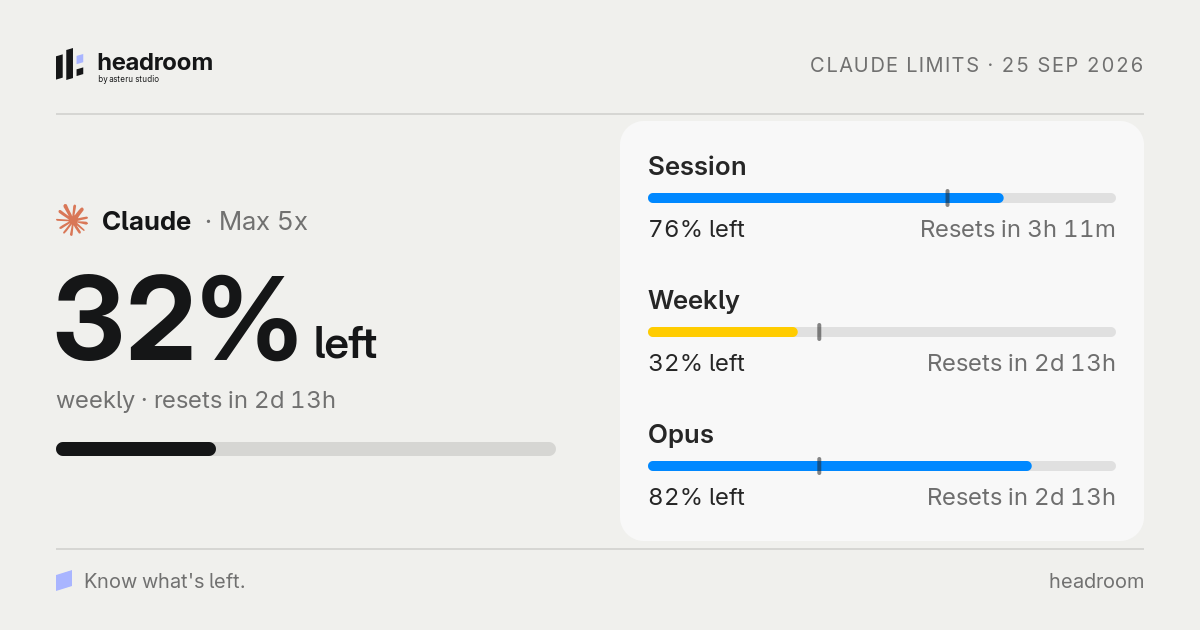
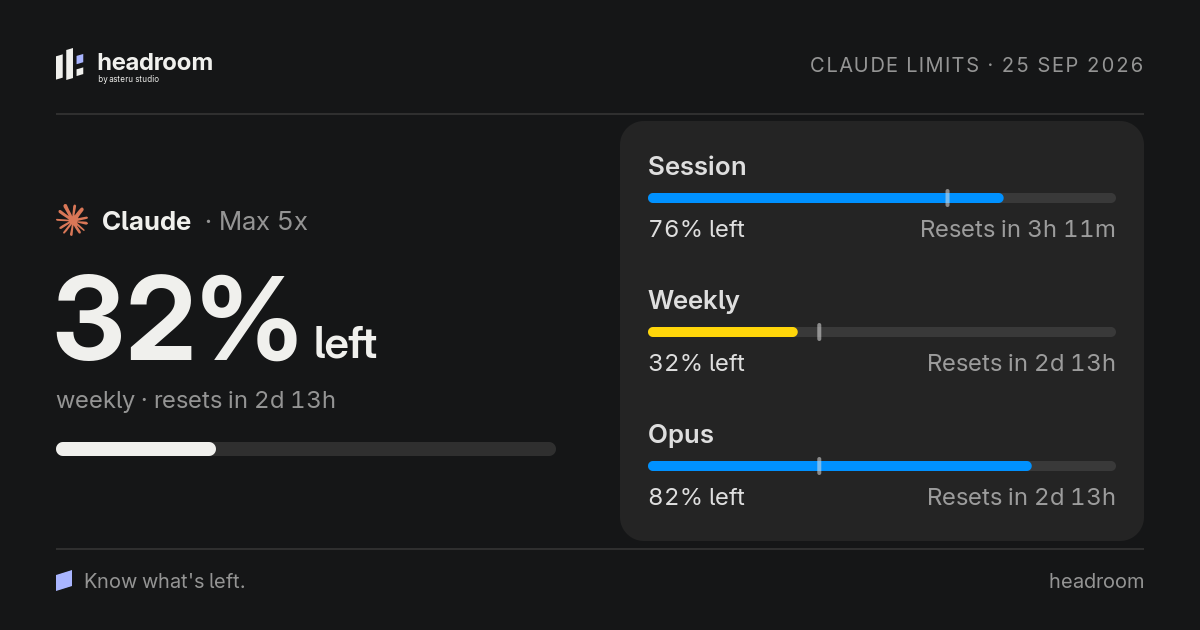
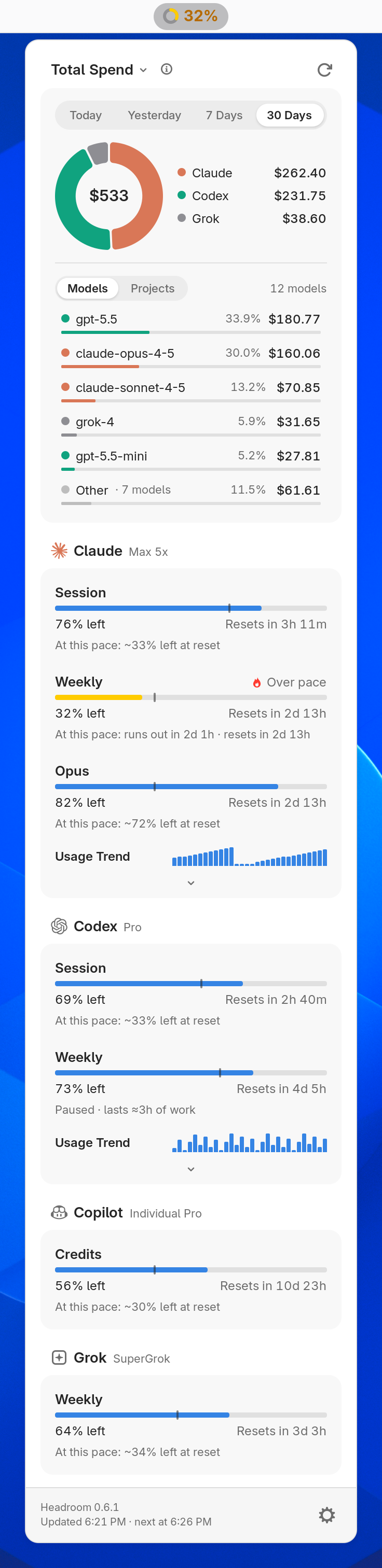
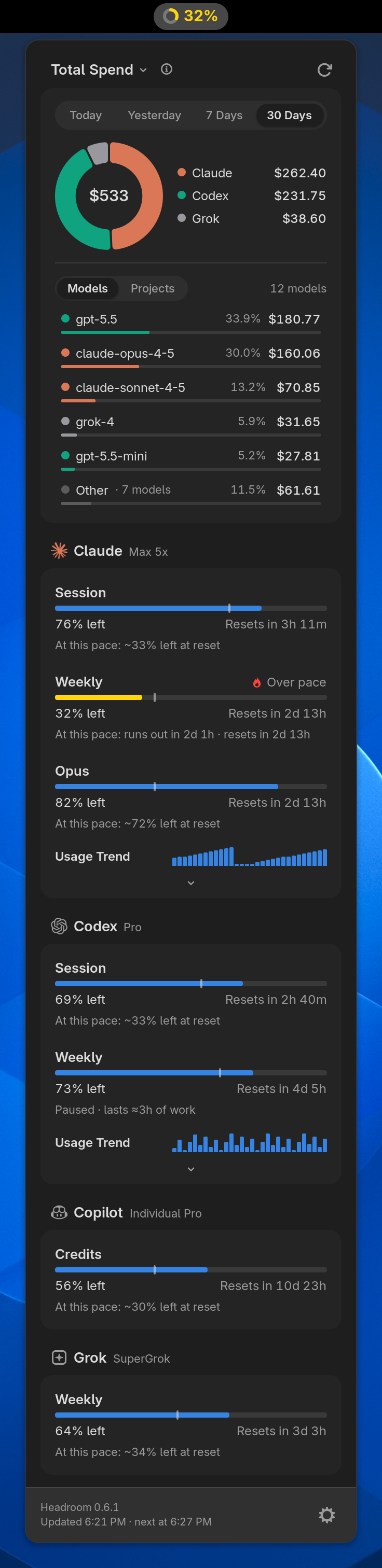
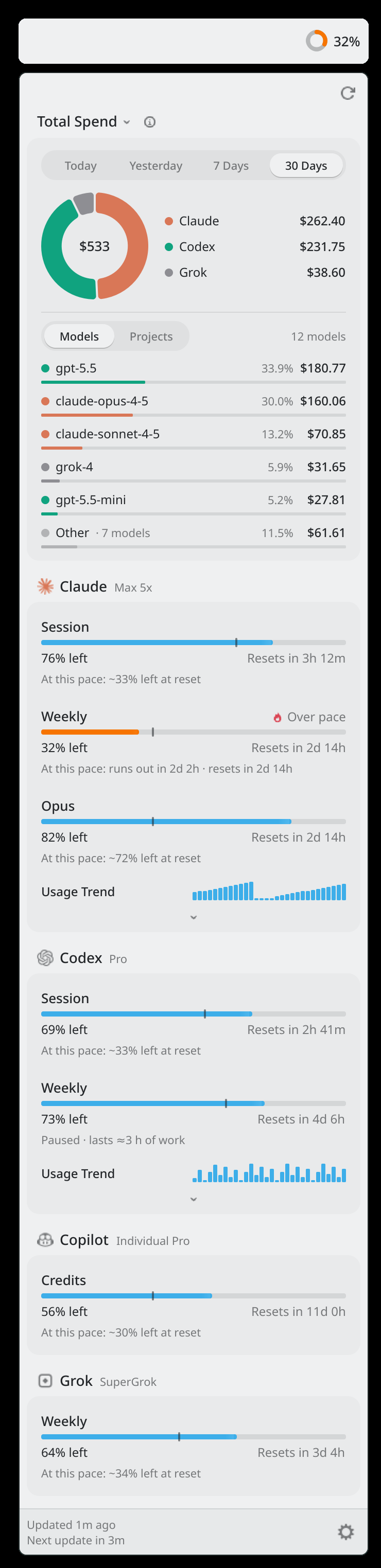
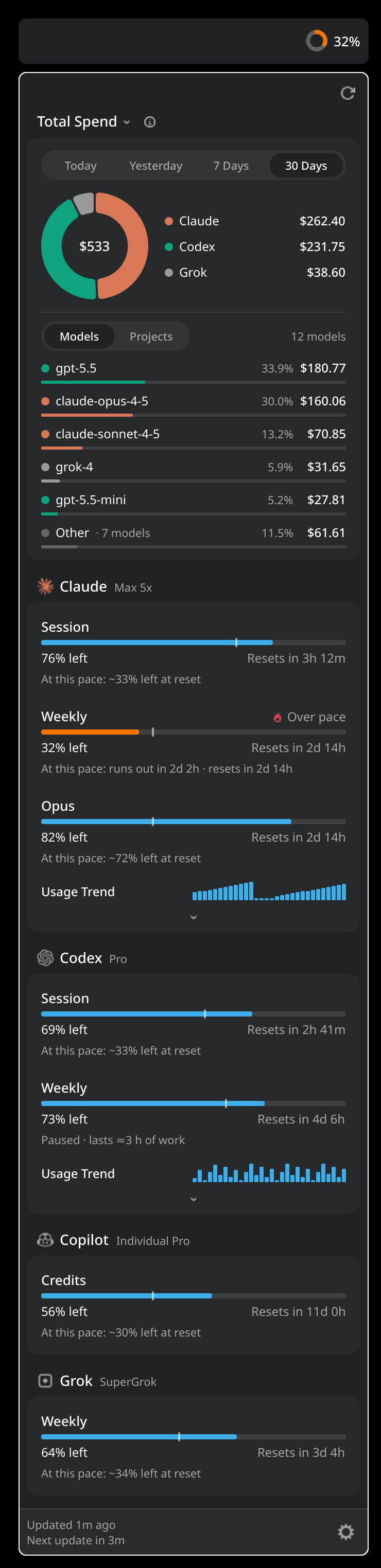
Headroom open under the panel of the chosen desktop: today's spend ring for Claude, Codex and Grok with the models behind it, and Claude, Codex, Copilot and Grok limits with pace ticks. Spend grows while you work; the Claude session meter fills, turns amber when it runs ahead of pace, says how much work is left while the agent is paused, and resets.

Your panel, your way.

One limit, several side by side, or just the Headroom mark tinted by the worst tone. A ring, a bar with the pace tick or plain text, placed where you want it.

Drag it along the bar, or focus it and use the arrow keys. Enter or Space moves it to the next spot.

Panel shows
Indicator style
Panel label
Position

The panel on every desktop

Know before you run out.

Every limit carries an even-pace tick and a forecast that follows how you work. While Claude Code or Codex runs, it reacts within seconds; when they stop, the card says how long the rest lasts.

Color follows pace, not just level: blue while you keep up, amber when you run ahead, red when the wall is close. Session windows follow your recent active pace, weekly limits keep the steady average.

Alerts fire when less than 5, 10, 20 or 30% is left, per provider, and when the pace says a limit will run out. Quiet hours hold them and send one summary.

How the forecast worksMore about alertsSeveral accounts as one

A weekly Claude limit with its even-pace tick. Move the week slider or pick a burn rate to see the remaining share, the forecast and the color change. Outside working hours nothing runs, so the forecast says how long the rest lasts at your working pace.

ClaudeWeekly

Left49%

At this pace: runs out in 2d 13h · resets in 4d 9h

Where the money goes.

Spend by model and by project for today, yesterday, 7 or 30 days: in dollars, in tokens or as cost per million tokens.

A project is the working directory Claude Code and Codex logged, and every project bar is split by provider.

Point at a provider for the models behind it.

Every token, and the terminal

An interactive Headroom spend card. Choose the period, switch the units between total spend, total tokens and cost per million tokens, and switch the breakdown between models and projects. Focus a provider to read its models.

$533
12 models
  • gpt-5.5$180.77
  • claude-opus-4-5$160.06
  • claude-sonnet-4-5$70.85
  • grok-4$31.65
  • gpt-5.5-mini$27.81
  • Other· 7 models$61.61

Four more reasons to keep it open.

It checks the provider's status, recovers sign-ins, shares a clean picture of your limits and hides the numbers on a shared screen.

Turn on provider status pages, and an incident or outage appears right on the card, with a link to the status page.

More about status pages

A Claude card in the Headroom popup. An amber incident notice appears on it with its stage, when it started and a Status page link, turns into a red partial outage, and disappears once resolved.

Everywhere you work.

A GNOME Shell extension, a KDE Plasma 6 widget, a tray app for every other Linux desktop and a menu-bar app for macOS. A CLI and a Waybar module cover the rest.

One Rust daemon collects, counts and forecasts. The shells only draw what it sends, so every surface shows the same number.

Runs onGNOME 46–50KDE Plasma 6.2+Any system tray, GTK 4.14+macOS 14+WaybarWayland and X11

The tray covers Xfce, Cinnamon, MATE, Budgie, LXQt, Hyprland, Sway, niri, river, labwc, Wayfire and COSMIC, plus i3bar, polybar and tint2 via snixembed.

The Headroom tray in full
The Headroom popup under the GNOME top panel: a 30-day spend donut with a breakdown by model, Claude over pace, a paused Codex weekly limit that shows how long the rest lasts, and Copilot and GrokThe Headroom popup under the GNOME top panel: a 30-day spend donut with a breakdown by model, Claude over pace, a paused Codex weekly limit that shows how long the rest lasts, and Copilot and Grok

Lives in the top bar: left, center or right, or drag it where you want it. Preferences are a native libadwaita window.

The Headroom widget in KDE Plasma 6: the panel percentage and the same popup with spend by model, limits with even-pace ticks and a paused forecastThe Headroom widget in KDE Plasma 6: the panel percentage and the same popup with spend by model, limits with even-pace ticks and a paused forecast

A Plasma 6 widget with the same popup and panel modes, vertical panels included. Live updates on 6.4+, polling before.

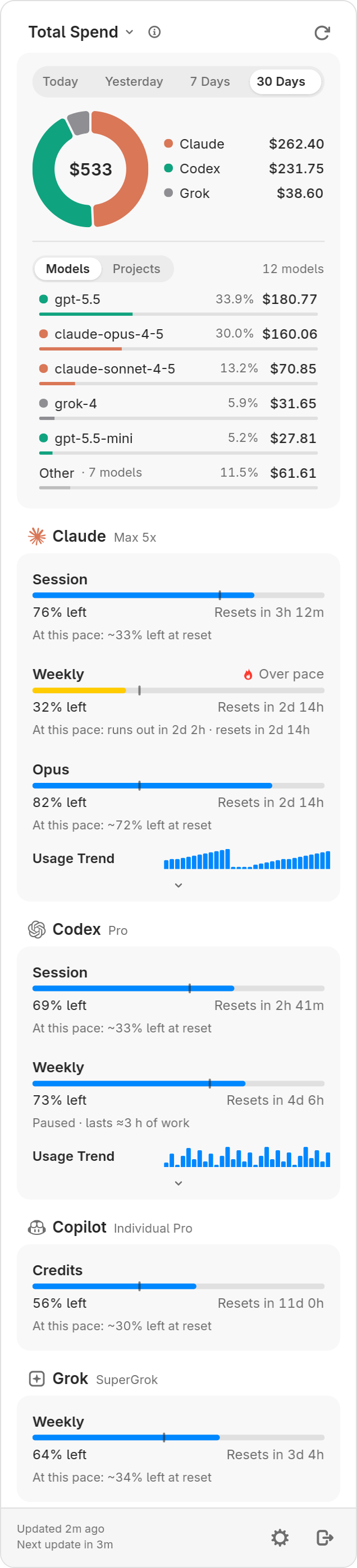
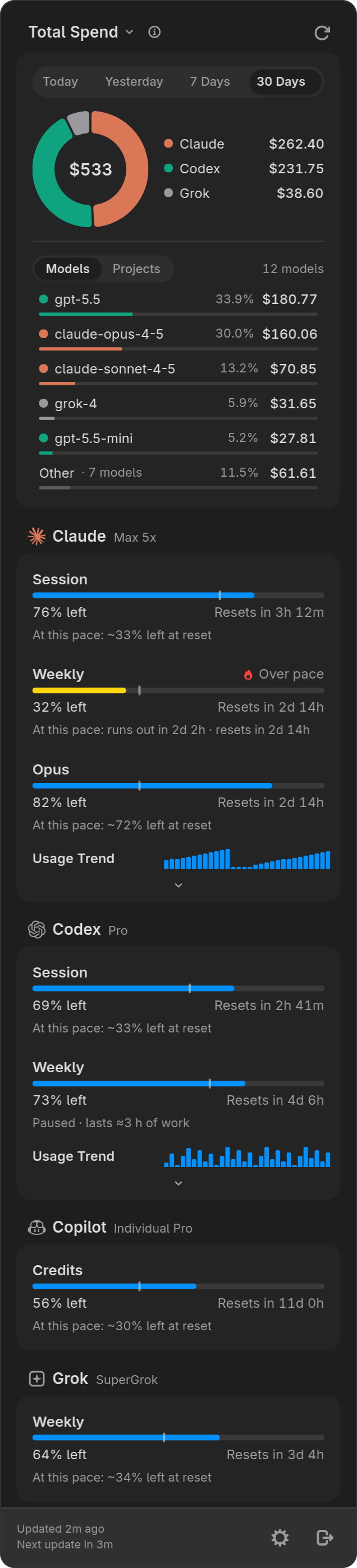
The Headroom tray popup: a spend donut with a breakdown by model and limits with even-pace ticks, the same cards as GNOME and PlasmaThe Headroom tray popup: a spend donut with a breakdown by model and limits with even-pace ticks, the same cards as GNOME and Plasma

The Headroom tray: an icon colored by pace, the same popup as GNOME and macOS, native GTK 4 settings and a global shortcut.

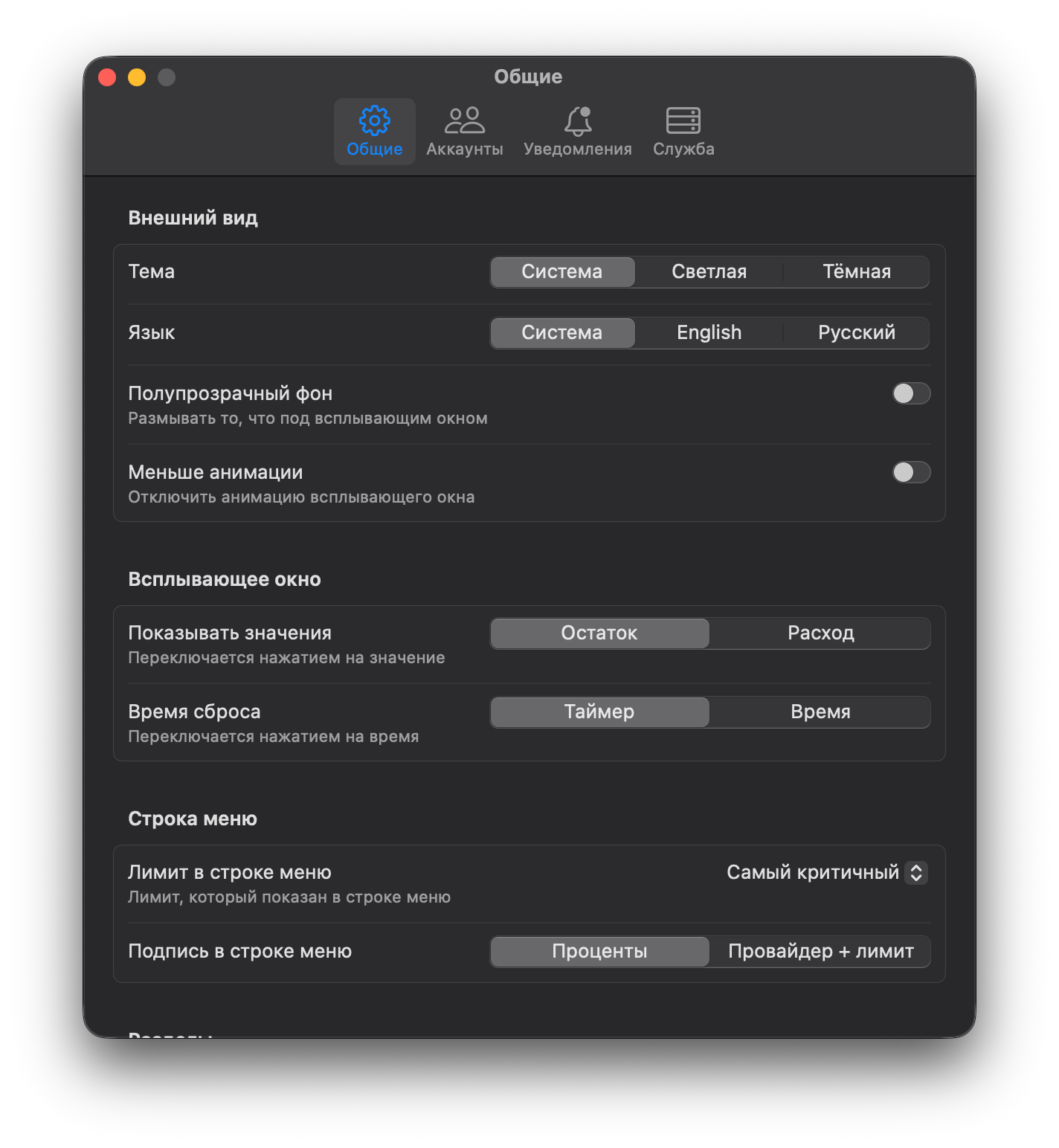
The Headroom settings window on macOS with General, Accounts, Notifications and Service tabs, Russian interface
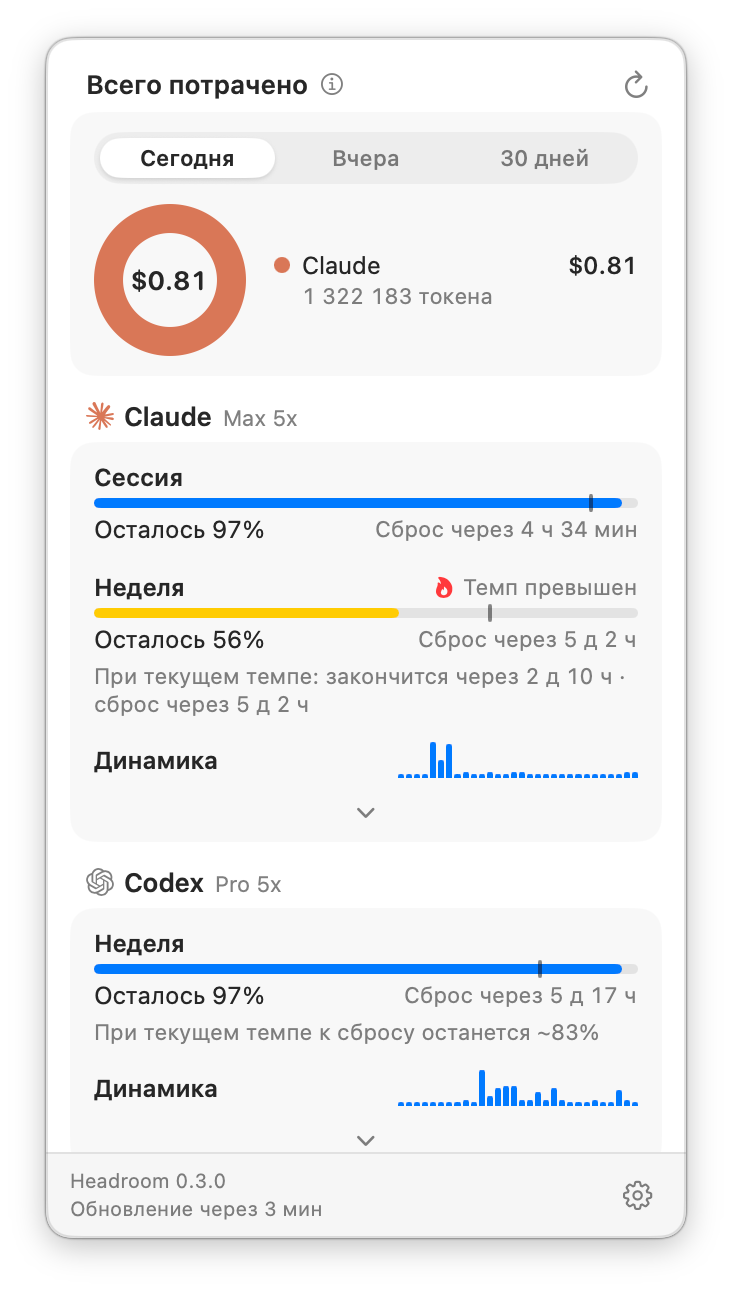
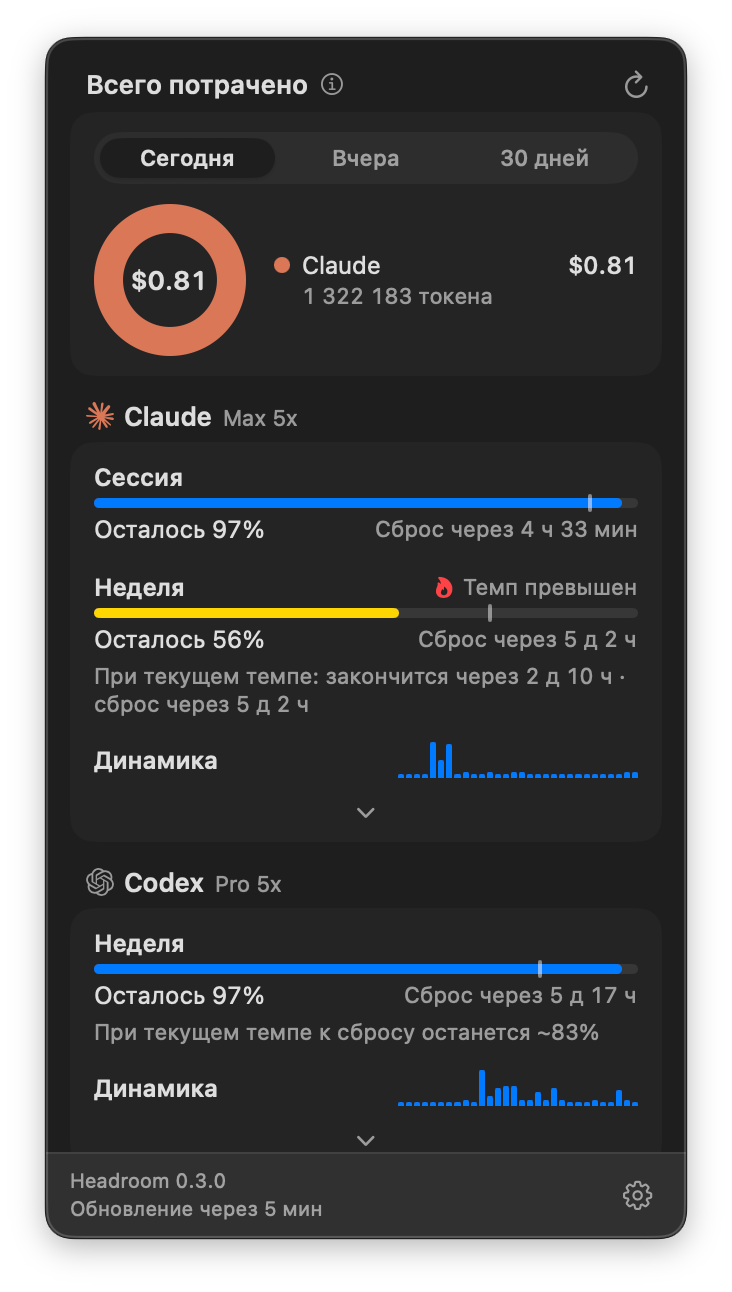
The Headroom popup under the macOS menu bar with Claude and Codex limits and a spend donut, Russian interfaceThe Headroom popup under the macOS menu bar with Claude and Codex limits and a spend donut, Russian interface

A SwiftUI app in the menu bar, with no Dock icon: up to three menu-bar items, ⌘-drag to move them. It updates itself with Sparkle.These macOS shots come from an earlier release and show the Russian interface. The current app has the same 0.6 features and speaks English by default.

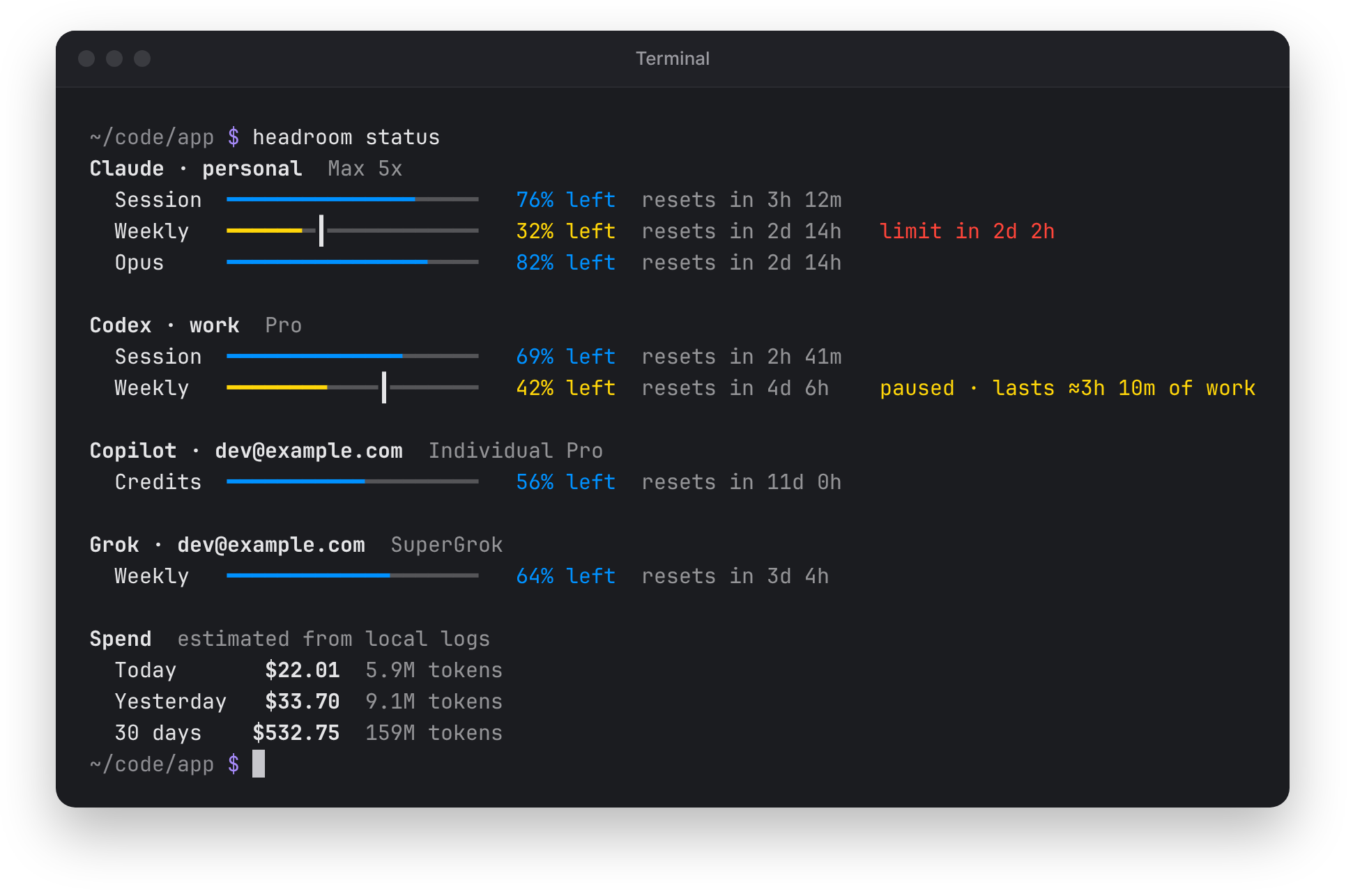
headroom status in a terminal: meters with pace ticks for each account, a run-out forecast on one weekly limit, a paused weekly limit that shows how long the rest lasts, and a spend summary
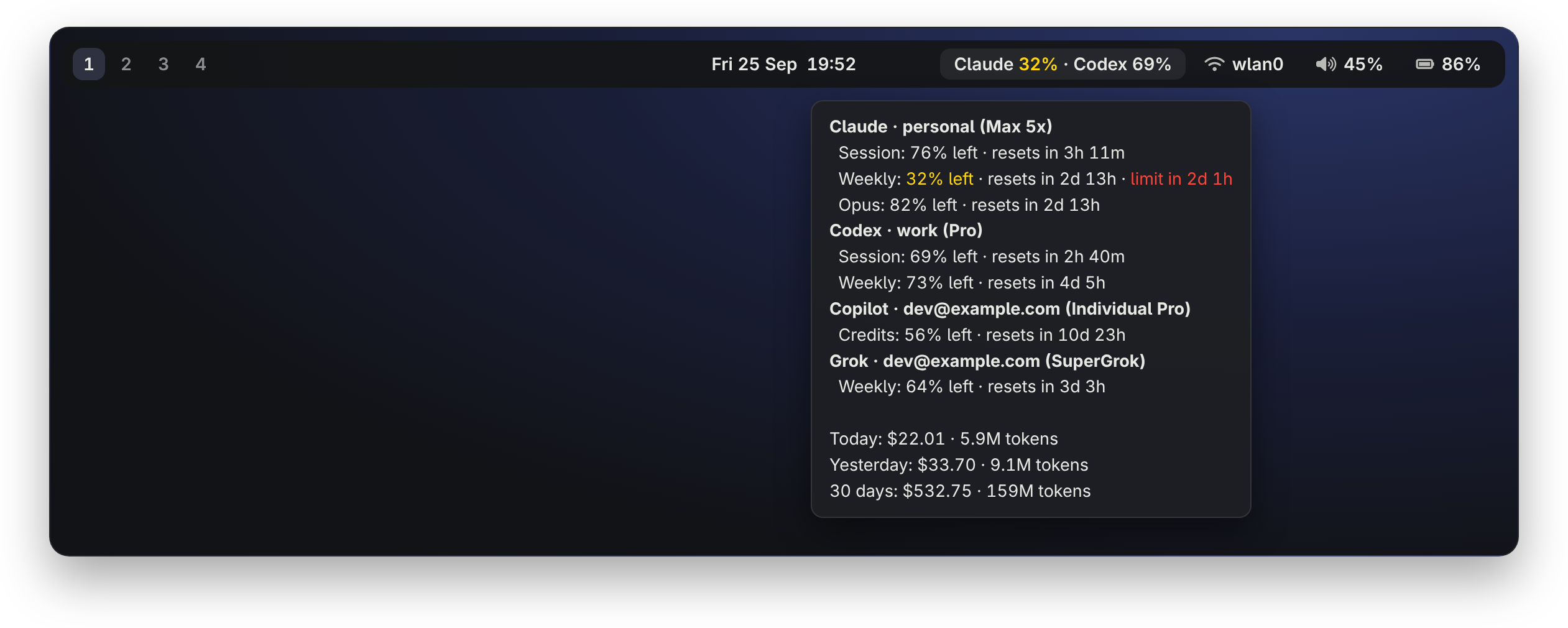
A Waybar panel whose Headroom module shows Claude and Codex side by side, with a tooltip listing every account and the spend

headroom status prints every limit with its forecast and your spend. headroom waybar streams one JSON line per change, with a tooltip for every account.

19 providers. Most take several accounts.

Signed in to codex or claude already? Headroom finds those accounts by itself. Pick a provider to see what it shows, how to add it and where its pages are.

Missing one?Request it

Codex

What you see

  • Session and weekly limits
  • Extra per-model limits
  • Credits
  • Tokens and spend from local logs

How an account is added

Found from the codex CLI. More accounts with headroom accounts add codex.

Quick links

On the card header and in its right-click menu.

Claude

What you see

  • Session and weekly limits
  • Per-model limits
  • Tokens and spend from local logs

How an account is added

Found from Claude Code config dirs. More accounts with headroom accounts add claude.

Quick links

On the card header and in its right-click menu.

OpenCode

What you see

  • OpenCode Go session limit
  • Weekly limit
  • Monthly limit

How an account is added

Paste an API key, or it is detected from opencode auth login.

Quick links

On the card header and in its right-click menu.

OpenRouter

What you see

  • Credit balance
  • Key limit
  • Spend today, this week and this month

How an account is added

Paste an API key.

Quick links

On the card header and in its right-click menu.

Z.ai

What you see

  • Session and weekly limits
  • Monthly limit
  • Web searches

How an account is added

Paste an API key.

Quick links

On the card header and in its right-click menu.

Kimi Code

What you see

  • Session and weekly limits
  • Per-model limits

How an account is added

Paste a Kimi Code API key, or sign in with kimi.

Quick links

On the card header and in its right-click menu.

MiniMax

What you see

  • Token Plan session limit
  • Token Plan weekly limit

How an account is added

Paste a Token Plan key.

Quick links

On the card header and in its right-click menu.

Grok

What you see

  • Weekly credit usage
  • Extra-usage cap
  • Tokens and exact logged cost

How an account is added

Sign in with grok, or it is detected from ~/.grok.

Quick links

On the card header and in its right-click menu.

Cline

What you see

  • Personal credits
  • Organization credits

How an account is added

Sign in with cline, or it is detected from ~/.cline.

Quick links

On the card header and in its right-click menu.

Devin

What you see

  • Daily and weekly limits
  • Extra-usage balance

How an account is added

Sign in with devin, or it is detected from the Devin CLI or app.

Quick links

On the card header and in its right-click menu.

Copilot

What you see

  • Chat and completions quotas
  • Credit quota
  • Extra usage

How an account is added

Every account signed in to gh is found. More with headroom accounts add copilot.

Quick links

On the card header and in its right-click menu.

Cursor

One account

What you see

  • Total, Auto and API usage
  • Request usage
  • On-demand spend

How an account is added

Detected from the Cursor app or agent login.

Quick links

On the card header and in its right-click menu.

Antigravity

Linux only for nowOne account

What you see

  • Session and weekly limits
  • Claude model limits

How an account is added

Detected from the running app or agy.

Quick links

On the card header and in its right-click menu.

Ollama Cloud

One account

What you see

  • Session, weekly and monthly limits
  • Extra usage

How an account is added

Detected from ~/.ollama/id_ed25519 when it is linked to ollama.com.

Quick links

On the card header and in its right-click menu.

Kilo Code

What you see

  • Credit balance in USD
  • Personal or organization
  • Used-up warning

How an account is added

Sign in with kilo, paste a Kilo API key, or it is detected from kilo auth login.

Quick links

On the card header and in its right-click menu.

Warp

What you see

  • Monthly credits
  • Reset time
  • Bonus credits

How an account is added

Paste a Warp API key (wk-…).

Quick links

On the card header and in its right-click menu.

Poe

What you see

  • Point balance

How an account is added

Paste a Poe API key.

Quick links

On the card header and in its right-click menu.

DeepSeek

What you see

  • API balance
  • In each currency the account holds, ¥ or $

How an account is added

Paste an API key.

Quick links

On the card header and in its right-click menu.

Moonshot API

What you see

  • Kimi Open Platform balance
  • Vouchers and cash
  • In $ on platform.kimi.ai, in ¥ on the mainland platform

How an account is added

Paste an API key.

Quick links

On the card header and in its right-click menu.

Pay-as-you-go balances show in their own currency, ¥, € or $, never converted or mixed. headroom providers prints the same list for your build.

Your usage stays on your machine.

No telemetry, no accounts, no server of its own. Headroom talks to the providers you use and fetches public price lists. Everything else is yours to switch off.

Light on your machine

daemon memory at idle
≈15 MB
CPU ticks in two idle minutes
0
one static binary
12.2 MB
of one core for the tray with its popup open
~0.5 %
  • One small update check a day

    A single request to GitHub with nothing attached, plus Check now on Linux when you ask. Turn it off in the settings.

  • Status pages only if you turn them on

    Every 5 minutes, one request per status page (two for Codex), only for providers you have accounts with, sent with the page's last ETag.

  • CLI sign-ins are read, never modified

    ~/.codex/auth.json, ~/.claude/.credentials.json and their Keychain items are never written or refreshed.

  • Keys stay locked away

    Headroom's own secrets live in the Secret Service on Linux and the Keychain on macOS, or in a private 0600 file when no keyring is available. Never in logs or process arguments.

Signed releases

On Linux, SHA256SUMS is signed with an Ed25519 key pinned in the installer and in headroom update, which refuse a release whose signature is missing or wrong. On macOS, Sparkle checks an EdDSA signature before it installs an update.

Open source under the MIT license. The Headroom name and logo are © Asteru Studio and not covered by it.

Know what's left.

One command for every Linux desktop, one for macOS. Free and open source.

curl -fsSL https://github.com/daniarjabagin/headroom/releases/latest/download/get-headroom.sh | sh
brew install --cask daniarjabagin/tap/headroom

Questions, bugs and new providers: Discussions Issues Contributing